
One Restaurant, Several Menus: Keep Dine-In, Delivery and Digital Ordering Coherent
Imagine a guest discovering a dish on a restaurant’s social page, following the ordering link and finding a different name, a different picture and no clear way to choose the variation they wanted. Inside the restaurant, the printed menu is correct. Somewhere between the kitchen, the designer and the delivery listing, the information has drifted.
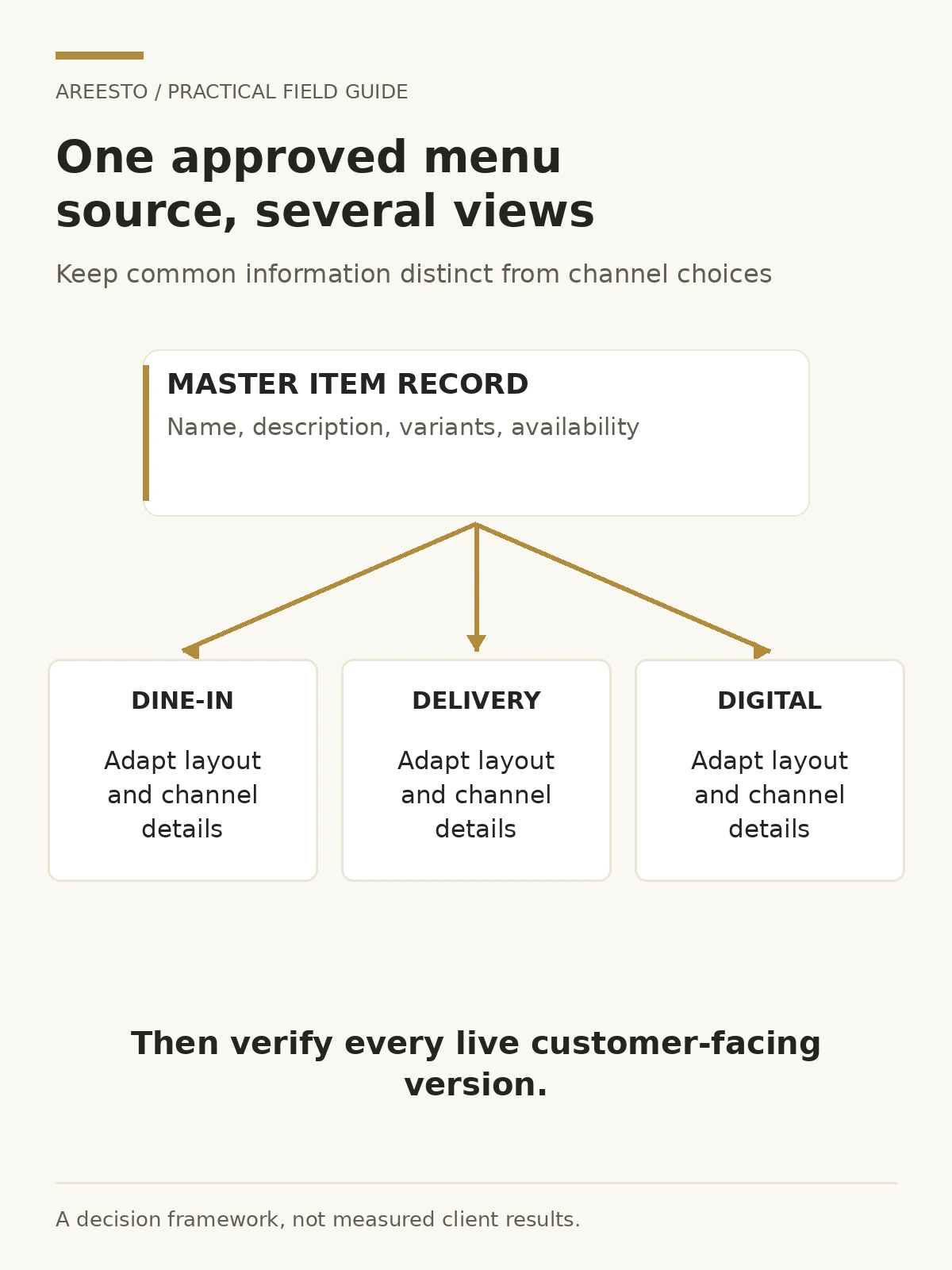
A coherent restaurant menu system keeps shared item facts in one approved source and adapts their presentation for dine-in, delivery and digital ordering. Consistency does not require every channel to look identical or offer identical terms. It requires deliberate differences instead of accidental contradictions.
Start with a master item record, not a new layout
Before redesigning the menu, collect the information the customer needs to make a choice. For each item, record the approved name, description, available variants, current availability and the imagery that may be used. If prices or terms vary by channel, store those distinctions explicitly rather than relying on someone to remember them during artwork changes.
Give each item a stable internal reference so teams can connect it across systems even when a customer-facing label needs adaptation. This does not mean customers must see a product code. It means the kitchen, operations team and designer can tell whether two records refer to the same offer.
Assign owners to the fields. The kitchen should confirm what is actually served. Operations should confirm availability and practical options. The appropriate commercial owner should approve current pricing and channel terms. The design team should not have to infer ingredients or invent descriptions to fill an empty space.
Record dietary or allergen information only through a competent, verified process. A designer cannot establish that a dish is suitable for someone with an allergy from its appearance or a short ingredient list. This guide is about information design, not legal or food-safety approval; confirm applicable obligations and operating procedures with the appropriate specialists.
| Field | Who confirms it | Design implication |
|---|---|---|
| Name and description | Content owner and kitchen | Accurate labels with a readable hierarchy |
| Variants and modifiers | Kitchen and operations | Understandable selection rules |
| Channel availability and terms | Commercial and operations owners | Deliberate channel differences |
| Approved image | Responsible content owner | A truthful match to the offered item |
Adapt the hierarchy for print, small screens and the ordering task
A dine-in guest may browse a full spread, compare categories and ask a server a question. A delivery customer may scroll a narrow list and choose quickly without that conversation. A digital menu should not be a miniature photograph of the printed sheet if the customer has to zoom repeatedly to understand it.
Keep the naming and category logic recognisable while adapting the layout. In print, use clear grouping and enough space to distinguish an item from its description and options. On a screen, make the item name, essential description and selection controls easy to find. Decorative styling should not conceal the action the person came to take.
Distinguish browsing from ordering. A QR code can lead to a reading menu, a booking page or a transactional flow; the destination should be clear. If the page cannot accept an order, do not make it look as though tapping an item adds it to a basket. State the next step in ordinary language.
For actual ordering controls, labels matter. W3C’s guidance on labelling controls explains why form fields, checkboxes and selection controls need associated labels. A visually attractive option selector is not enough if people cannot understand or operate it. Ask the platform owner to test the implemented controls rather than approving a static mock-up alone.
Restaurant branding connects the visual promise with this practical journey. When briefing restaurant marketing and design support, include the path from discovery to menu to next action, not only the appearance of the printed cover.
Keep language, imagery and variants aligned with what is served
Build an approved terminology list for English and Arabic item names where both languages are used. Do not rely on several people translating independently across the printed menu, website and delivery platform. Consistent terminology helps customers recognise the same offer, while descriptions can still be adapted to suit the available space.
Review mixed-direction content in the actual digital layout, especially prices, numerals, punctuation and English names within Arabic text. W3C’s bidirectional text guidance explains why these combinations need deliberate handling. This is a technical presentation issue as well as a language-proofreading task.
Match images to the offered item and variant. A photograph of a larger sharing portion should not silently illustrate an individual portion. If an image is representative rather than exact, consider whether it could mislead and whether a different choice is needed. Do not use generated food imagery as supposed evidence of the restaurant’s actual dishes.
Variants also need consistent logic. Separate what is included, what is optional and what cannot be changed. If a platform limits how choices can be displayed, involve operations in finding an accurate presentation. Do not hide an important condition in decorative copy that disappears on a small screen.
Give updates an owner and a release process
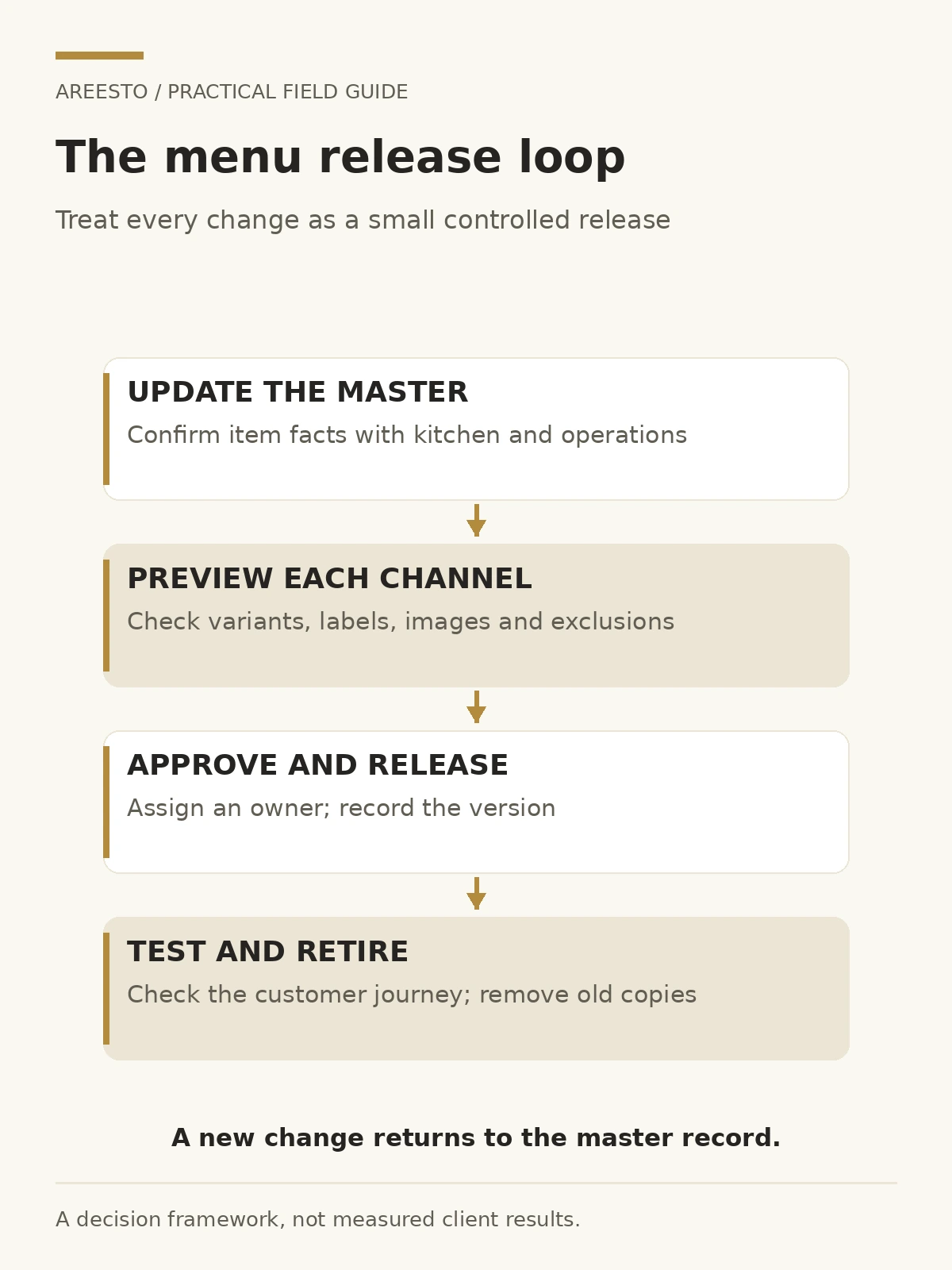
A menu becomes inconsistent when updates begin in the most convenient file rather than the approved source. Someone changes a printed price, another person edits a delivery description and a third schedules an old promotional image. Each action looks reasonable in isolation. Together, they create competing versions of the offer.
Use a change log with the item reference, the requested change, its approval owner and the affected channels. Record whether it is temporary or ongoing. A sold-out item may need an availability update rather than a permanent deletion; a renamed dish may require a coordinated change across several assets.
Preview each affected channel before release. Check that the description fits, the correct image is attached, variants remain understandable and language versions agree. Some third-party interfaces may update differently from a restaurant’s own website, so record who verifies the customer-facing result rather than assuming a saved edit is already live.
Keep a last-known-good version of artwork and source data. If a release introduces an error, the team needs to know what to restore and where. Retire old print files from working folders so a supplier does not reprint them during the next order. Keep an archive without leaving obsolete files mixed into the current production set.
Test the whole journey, then improve what the evidence shows
Run a small set of realistic tasks after an update: find a particular dish, understand its options, follow the intended next action and confirm the information shown at the end. Use an ordinary phone as well as the design team’s larger screen. Include the languages and channels customers actually use.
Check QR destinations and visible links, not just printed appearance. A code can remain scannable while leading to an outdated file or the wrong location’s menu. If several branches have different availability, make the relevant location clear before the customer relies on the information.
Gather practical evidence from customer questions and staff feedback. Repeated requests for clarification may reveal a naming or hierarchy problem. Distinguish that from a fulfilment problem: clearer copy cannot make an unavailable item available. Improve the system responsible for the issue instead of treating every friction point as a graphic-design task.
Do not promise that a revised menu will produce a particular sales increase. Review whether the information is accurate, choices are understandable and the journey works, then assess commercial performance carefully alongside other changes. Promotions, availability and operations can all affect the result.
A useful next step is a channel inventory: list the current menu versions, the owner of each and the items that do not agree. Bring that inventory to a discussion about a coordinated restaurant marketing system. Fixing the source and handoffs gives the next design a better chance of staying coherent.
Frequently asked questions
Should delivery and dine-in menus be identical?
Not necessarily. Availability, presentation and channel terms may differ. Shared item facts should remain accurate, and differences should be intentional and clearly explained.
Is a PDF behind a QR code enough for a digital menu?
It can work in some situations, but test readability and the intended task on a phone. A fixed layout that requires constant zooming may need a different digital presentation.
Who should own restaurant menu updates?
Name one coordinating owner and assign field approvals to the relevant people. Kitchen, operations, commercial and content responsibilities should be explicit rather than delegated entirely to the designer.
Can a menu redesign establish allergen information?
No. Design can present verified information clearly, but the underlying information needs a competent food-safety and operational process. Do not infer suitability from images or incomplete descriptions.